Using a Gen 1 Invisible Witness Smart Gate
Using an Invisible Witness gate — generation 1 design.
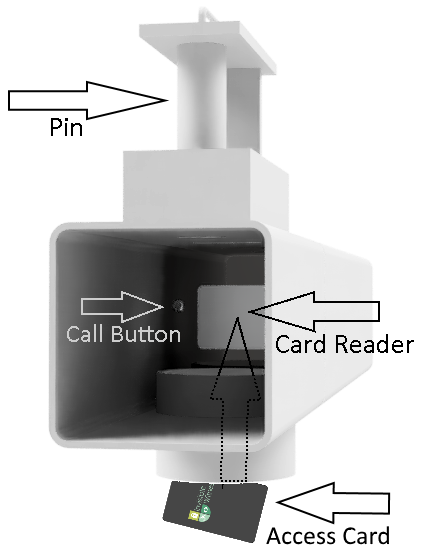
Your Gen 1 smart gate is opened and locked with an access card and the sliding pin. Here's how to use it.
Note: You will need an access card assigned by the gate owner.
How to open the gate
- Try to lift the pin — maybe it's unlocked already.
- If the pin will not lift, present your card to the card reader by reaching up into the steel tube. Feel around for a rectangular panel and place the card on the panel.
- If the card is recognized, you will hear the locking mechanism start, at which point you can remove the card.
- After the locking mechanism has finished unlocking, lift the pin and open the gate.
How to lock the gate
- Close the gate.
- Replace the pin.
- Present your card to the card reader until you hear the locking mechanism start to lock.
Troubleshooting
- If the system is busy (e.g. satellite transmission), the card reader may not react right away.
- Continue to hold the card at the reader for up to 30 seconds.
- If the card still does not work, contact the gate owner.